Welcome to MIDI Memories
Thanks for spending some time to get more familiar with MIDI Memories. MIDI Memories records events, capturing MIDI effects as editable regions. It also displays useful chord and scale information.
It runs as a MIDI effect in audio apps, changing the timing or velocity of notes. This means the setup is a bit different to normal audio effects plugins. We have setup guides for Ableton Live, Cubase, Bitwig, Logic Pro, and Reaper.

Recording #
To record events, add MIDI Memories after effects you’d like to capture, but before instruments. For example, if you’re using an arpeggio plugin and a piano, and you’d like to capture the results of the arpeggio, insert MIDI Memories after the arpeggio plugin, but before the piano instrument. The exact setup can vary a bit, depending on the music app, so please consult the relevant setup guide.
Once MIDI Memories has been added, simply press play to record events. MIDI Memories is always recording during playback. The last five recordings are kept, so if you bump play by mistake, you won’t lose the previous recording.
When you’d like to add a recording as an editable MIDI region in your music app, drag the MIDI document icon from MIDI Memories onto the arrange area in your music app.
TODO: Image.
Saving MIDI files #
The MIDI document icon can also be dragged to your desktop and other places. If you do that, it will appear as a MIDI file.
Chord recogniser #
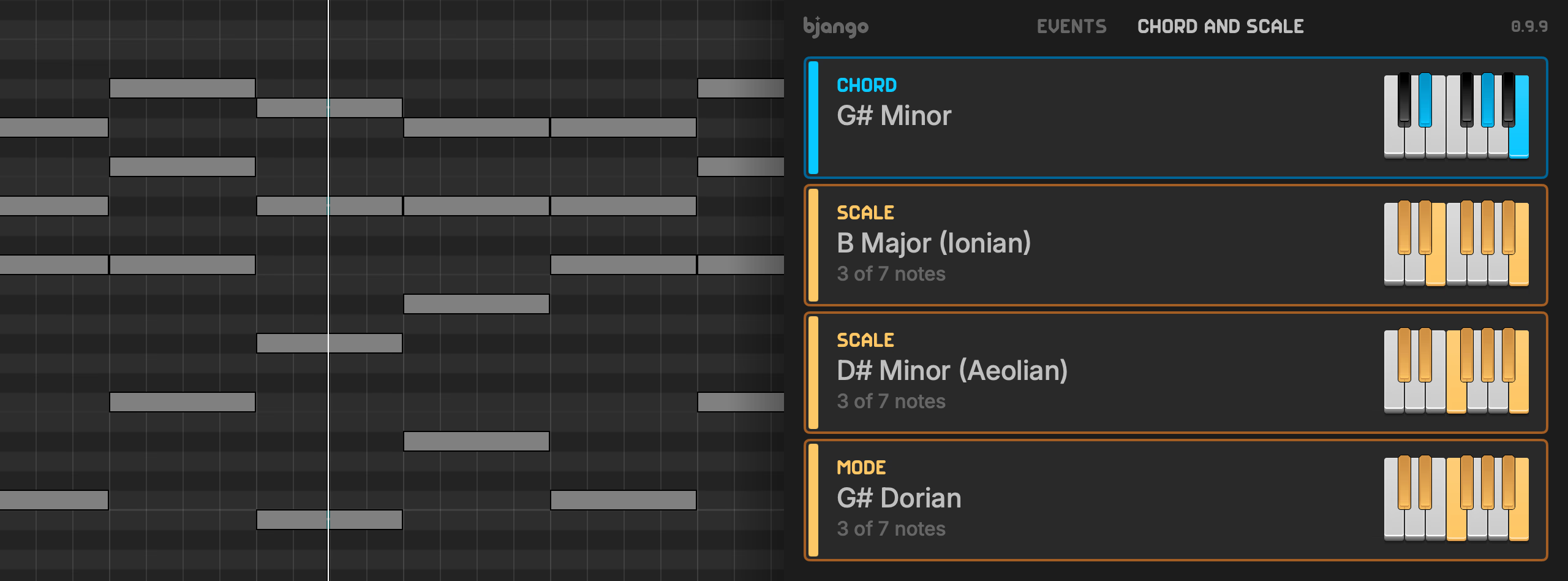
Clicking chord and scale will switch MIDI Memories to the chord and scale information tab. When on that tab, the currently playing chord will be shown, if a chord is recognised. MIDI Memories supports a wide range of chords, and our goal is to expand what can be detected over time. If there’s a chord type you think we should support, please get in contact.
Scale guesser #
While on the chord and scale, holding notes will list the scales and modes that include those notes. Please note that the lowest note will be considered the scale or mode tonic. MIDI Memories shows the top three matches, ranked by more common scale and mode types.
This lets you find pleasing harmonies first, then discover a scale or mode that fits, even if it’s something unusual like phrygian dominant or double harmonic major.
Resizable interface #
MIDI Memories features a resizable plugin interface, so the chord names and other info can be visible from across the room, if you’d like.
Instrument version #
Some apps, like Mixcraft and Fender Studio One, require MIDI effects plugins to be tagged as an instrument. We have a special version of MIDI Memories for apps with this requirement. If the main version of MIDI Memories doesn’t work in your music app, please try the version below.